Part of the Indexing Problems topic guide. Use the guide to move from this specific question to the full diagnostic workflow.
Start with the strongest evidence you are authorized to access. For a URL in your verified property, URL Inspection can separate discovery, fetch, indexing, canonical and blocking states. For a third-party backlink URL, an external check can record a dated observation but cannot reveal the property’s private Search Console reason. Classify the evidence first, then investigate possible causes without turning one status into a guaranteed diagnosis.
This page is the classification entry point for the Indexing Problems owner network; specialist pages handle each supported state after classification.
What indexing group does the evidence support?
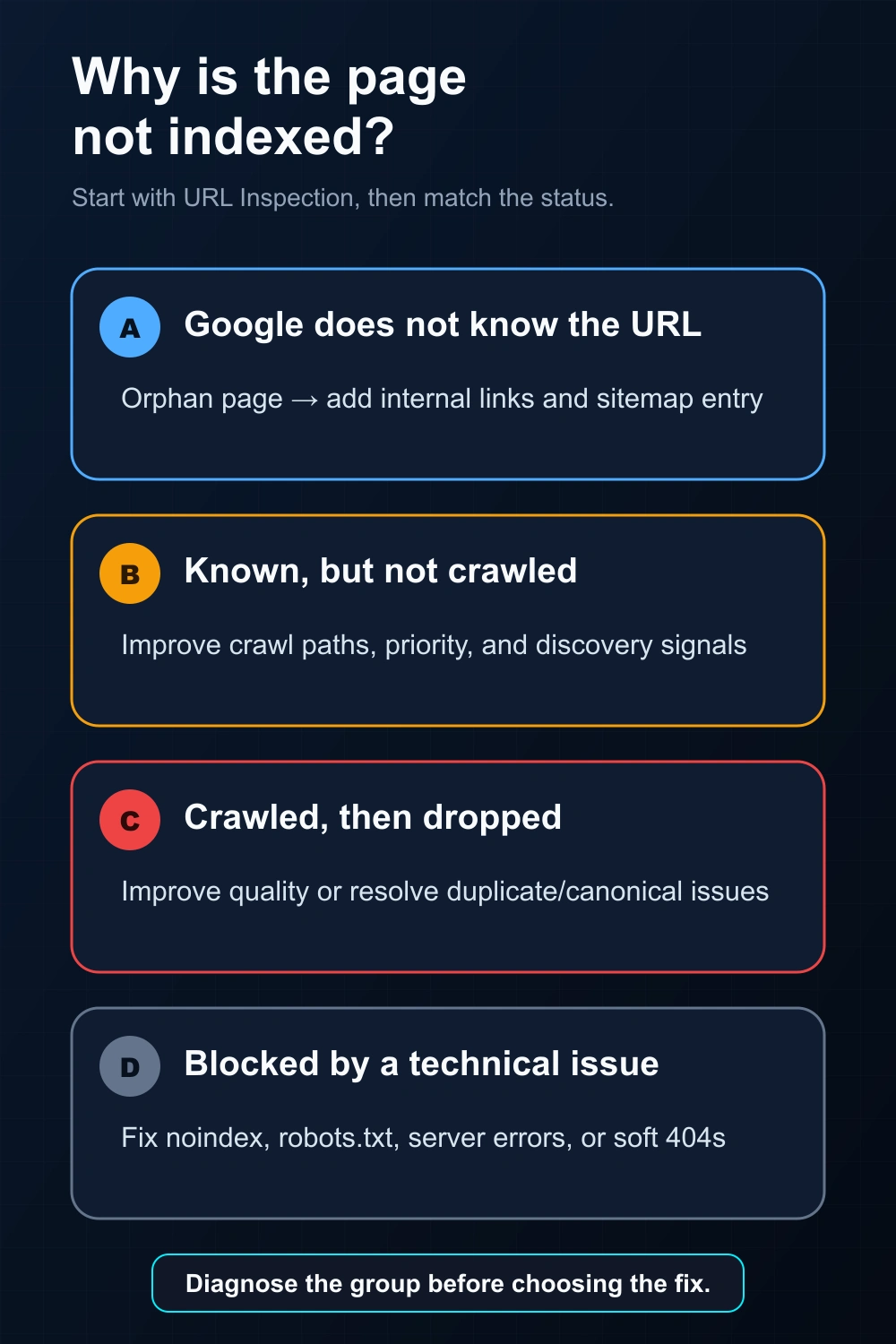
Open URL Inspection (for a page in your own property) or a bulk index checker (for external URLs), read the status, then match it to a group below.
Group A — Google doesn’t KNOW the URL
- Orphan page — no internal links, not in the sitemap. Fix: add internal links and include it in your sitemap.
Group B — Google knows but hasn’t CRAWLED it
- “Discovered – currently not indexed” — Google knows the URL but the report has no completed crawl. Investigate discovery paths, internal prominence, host availability and crawl demand before choosing an action.
Group C — Crawled but DROPPED
- “Crawled – currently not indexed” — a crawl is recorded but the URL is not currently indexed. Review rendered content, duplication, canonical signals, directives and changes since the recorded crawl.
- “Duplicate without user-selected canonical” — duplication. Fix: declare a canonical or differentiate.
Group D — BLOCKED (technical)
- A
noindextag/header, a robots.txt block, or server errors / soft 404s. Fix: remove the block or fix the technical issue.
Specialist status owners
- Soft 404 — a successful or redirected response that Google classifies as missing or not a useful representation.
- Server and access errors — 5xx, 429, 401/403, timeout, connection, DNS and robots.txt availability evidence.
For backlinks
For a backlink URL, investigate the source page rather than assigning a cause from the target page. Without property-level Search Console evidence, keep the result as a dated external observation and review the source page’s availability, link presence and visible indexability signals. See why backlinks don’t get indexed.
How do you avoid fixing the wrong problem?
Diagnose before acting. Improving content won’t help a page blocked by robots.txt; requesting indexing won’t help a page Google never crawled because it’s orphaned. For URLs in your own verified property, URL Inspection names the group in seconds — start there. For URLs you don’t own, begin with a bulk index checker and treat the result as a dated external observation.
One early branch is to distinguish crawl blocking from index blocking: robots.txt controls fetching, while a noindex directive controls indexing after Google can retrieve it.
Confidence labels and stop conditions
| Evidence level | Allowed conclusion | Stop condition |
|---|---|---|
| Property-level recorded status | Name the recorded discovery, fetch, canonical, directive or indexing state | Do not convert the status into one cause unless the supporting field establishes it |
| Property-level live test | Describe the current fetch and visible indexability result | Do not use it as proof of the stored indexed representation |
| External exact or alternate observation | Report what URL form was or was not observed, with method and time | Do not assign a private Search Console exclusion reason |
| Unavailable check | Report that no conclusion could be produced at that time | Exclude it from verified indexed/not-observed counts until the method returns a result |
Escalate rather than guess when the source is gated, unstable, redirected through an unresolved chain, rendered differently for crawlers, or outside the evidence you are authorized to inspect. A provider report becomes more credible when “unknown” is preserved as a real state.
The evidence-preserving decision tree
- Unknown: confirm discovery paths and sitemap declarations.
- Known, not fetched: inspect accessibility, linking and crawl evidence.
- Fetched, not selected: review content, directives and indexed-report reasons.
- Alternate selected: compare declared and Google-selected canonical.
- Observed externally only: avoid assigning a Search Console reason without property evidence.
What evidence belongs in a provider escalation?
A backlink seller usually cannot inspect the source domain’s private Search Console data. Escalate with an evidence packet the publisher or property owner can act on: source URL, final URL, HTTP result, expected link and anchor, rendered-link presence, visible robots/canonical signals, observation method, timestamp and the precise unknown that requires owner evidence.
| Provider observation | Owner-only evidence needed | Do not infer |
|---|---|---|
| No indexed representation observed externally | Recorded indexing state and Google-selected canonical | “Crawled—currently not indexed” |
| Live response contains noindex | Whether Google has reprocessed the changed response | That removal immediately restores indexing |
| Canonical points elsewhere | Google-selected canonical and cluster evidence | That the declaration was accepted |
| Fetch is denied or unstable | Server logs, firewall/CDN rules and Search Console fetch evidence | A content-quality rejection |
How should the final diagnosis be written?
Write three fields: observed state, supported causes and next evidence required. Example: “The source returned 200 and the expected link was present at 10:00 UTC; no indexed representation was observed by the named external method. The Search Console reason is unknown. Request the owner’s canonical and indexing fields before assigning a cause.”
This format gives the buyer useful information without exposing private campaign-processing methods or claiming certainty the available evidence cannot support. See the IndexVero methodology for the public standard.
FAQ
How long until a new page is indexed?
There is no universal timeframe and indexing is not guaranteed. Use dated checks and the current evidence state instead of promising a fixed window. See how long indexing takes.
How do I know the exact reason?
For a property you’ve verified, start with URL Inspection — it names the group directly (crawled, discovered, duplicate, blocked, etc.). For URLs you don’t own, you can’t use URL Inspection; rely on a bulk index checker as a dated external observation instead.
Can I check pages that aren’t in my Search Console?
Not with URL Inspection. Use a bulk index checker for external URLs and backlinks.
If the URLs you need indexed are backlinks on sites you don’t control, Search Console can’t submit them for you. Our backlink indexing service handles third-party URLs in bulk and verifies the outcome.